The AI voice keyboard for iPhone
Say it. Send it.
Cerebro Keyboard is an AI voice keyboard for iPhone. Tap the orb, speak, and your words appear as text in WhatsApp, Mail, Notes and almost any other app.
On your computer? Point your iPhone’s camera at the code to open Cerebro Keyboard in the App Store.
Free download with 20 transcriptions a month. No account needed.
“Best one I've found so far.” Ivan Inflight, CanadaWorks in MessagesWhatsAppMailNotesSlackReminders and almost any other app with a text field
No account. Just talk.
Set it up once, then speak freely wherever you type.
-
Install the Keyboard
Download Cerebro Keyboard and add it in your iOS keyboard settings. Allow Full Access so the microphone can be used for transcription.
-
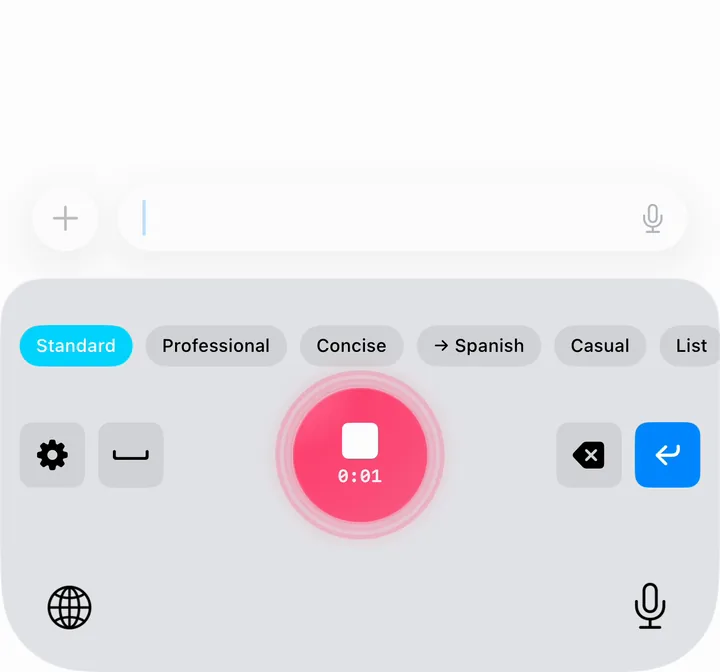
Tap the Mic
In the app you’re typing in, switch to Cerebro Keyboard and tap the glowing orb. The first time, Cerebro opens for a moment to start listening — just swipe back.
-
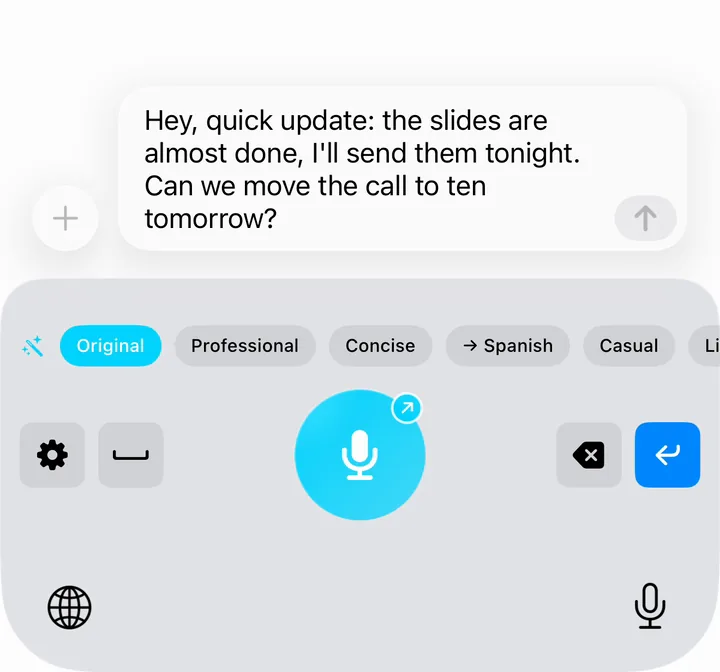
Speak and Send
Your words appear as text right where you’re typing. For 10 minutes after each dictation, the mic starts instantly, with no app switch.
Speak once. Send it any way you want.
Pick a mode, speak once, and the AI rewrites your words before they’re inserted: professional emails, casual texts, translations.
Polished and business-appropriate, with the same meaning.
can you send me that thing when you get a sec
Could you send me that when you have a moment?
Cuts the filler and gets to the point.
I just wanted to quickly check whether you had a chance to look at it yet
Did you get a chance to look at it?
Translates what you said into the language you pick.
La reunión es mañana a las tres
The meeting is tomorrow at three
Relaxed and friendly, like a message to a friend.
I would be grateful if you could respond at your earliest convenience
would be great if you could get back to me
Turns rambling into bullet points or a to-do list.
okay so I still need to book the dentist for Thursday, oh and return the library books, and I really should call the landlord about the heating
• Book the dentist for Thursday • Return the library books • Call the landlord about the heating
Swaps out swear words and keeps everything else.
this damn thing is broken again
this thing is broken again
Turns what you said into a short email, ready to send.
tell Sarah the report is late because the numbers only came in Friday, she gets it Tuesday
Hi Sarah, The report is running late because the numbers only came in on Friday. You'll have it on Tuesday. Best regards
Modes from the community
Switch on modes other people wrote, each one checked before it’s published.
- Shakespeare Alas, this night I cannot come, for weariness doth weigh upon me.
- Pirate Ahoy, ye scallywags! The meetin' be startin' in five minutes!
Your voice, your rules
Create your own AI mode with any prompt you can imagine. Summarize, turn it into a haiku, rewrite as a tweet — anything.
7 built-in modes, 4 community modes and as many custom modes as you like. You can also submit your own to the community.
11 languages, 30 to translate
The app speaks your language, and AI modes translate what you say.
Automatic Language Detection
Speak English, German or one of many other languages. Cerebro Keyboard detects the language by itself, so there’s nothing to switch.
How accurate a transcription is varies by language.
- English
- German
- French
- Spanish
- Italian
- Dutch
- Norwegian Bokmål
- Swedish
- Danish
- European Portuguese
- Brazilian Portuguese
- → English
- → German
- → French
- → Spanish
- → Italian
- → European Portuguese
- → Brazilian Portuguese
- → Dutch
- → Swedish
- → Danish
- → Norwegian Bokmål
- → Finnish
- → Polish
- → Czech
- → Hungarian
- → Romanian
- → Greek
- → Turkish
- → Russian
- → Ukrainian
- → Arabic
- → Hebrew
- → Hindi
- → Simplified Chinese
- → Traditional Chinese
- → Japanese
- → Korean
- → Indonesian
- → Vietnamese
- → Thai
Your thumbs will thank you
In a Stanford study, speaking was about three times faster than typing on a phone. Here’s what that adds up to.
- Per Day
- 20 min
- Per Month
- 10 hr
- Per Year
- 122 hr
30 minutes of typing, spoken in about 10 minutes
Example calculation based on Ruan et al., Stanford University (2016). Cerebro Keyboard shows your own estimate in the app. Read the Stanford study (PDF)
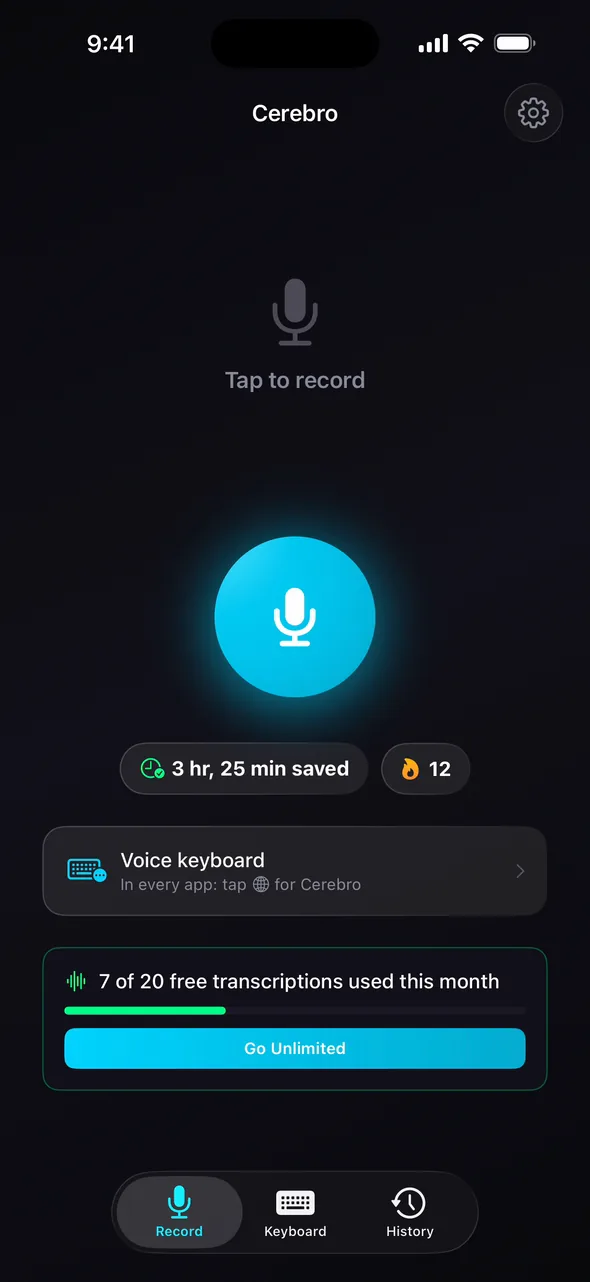
Everything you need to speak, not type
Powerful AI transcription paired with tools that make voice input actually useful.
Transcription by OpenAI
Cerebro Keyboard sends your recording to OpenAI’s speech-to-text model and inserts the result right where your cursor is. No copying, no pasting.
Background Flow Sessions
Tap the mic and Cerebro starts a session for you. The microphone then stays ready for 10 minutes after each dictation, and you can end the session from the Dynamic Island or Lock Screen.
Custom Dictionary
Add names, technical terms, and custom vocabulary so the AI recognizes the words that matter most to you.
No Dictation Gets Lost
No connection, or a hiccup on the way? Cerebro Keyboard keeps the recording and sends it by itself as soon as it can. Your text follows.
Emoji Suggestions
After a dictation, Cerebro Keyboard suggests up to two emoji that fit what you said, picked on your iPhone (for English and German text).
See Your Time Saved
See an estimate of how much time you’ve saved compared with typing, right in the app.
What happens to your voice
Cerebro Keyboard sends only what it needs to. Here’s exactly what leaves your iPhone and what doesn’t.
- Your iPhone records only after you tap the orb
- Our server in Germany passes the audio on
- OpenRouter routes it to OpenAI
- OpenAI turns it into text; according to OpenAI, it doesn’t keep the audio
- Your app gets the text, and the audio is discarded
Text you send to an AI mode goes to Claude by Anthropic, on servers that keep nothing.
Audio Isn’t Kept
Your recording goes through our server in Germany to OpenAI for transcription, on servers outside the EU. Afterwards the audio is discarded; we don’t store it.
Transcripts Stay on Your iPhone
Your transcriptions are saved only on your device. Text you send to an AI mode goes to Claude by Anthropic, on servers that keep nothing.
No Keystroke Logging
Full Access is used only to reach the microphone and send audio for transcription. Cerebro Keyboard never logs, reads or sends what you type. No account needed.
What you dictate is processed by AI models from OpenAI and Anthropic. Don’t dictate passwords, card numbers, health information or anything else confidential.
What people say
Best one I've found so far.
Using this app to write this review!! It is quite fantastic. Any feedback that you give them, they improve within a very short period of time. With just one click, I can translate into Spanish and do a full dictation. Well done.
Cumple a la perfección
Cerebro Keyboard te permite dictarle al teléfono con total normalidad. Entiende perfectamente, colocando comas o signos varios donde hace falta. Muy útil.
Translated from Spanish
Does the job perfectly
Cerebro Keyboard lets you dictate to your phone completely naturally. It understands perfectly, putting commas and other marks where they’re needed. Very useful.
From the maker
I write most of my messages on my phone, and I wanted to talk instead of thumb-typing, right in the app I’m in, without copying text over from a dictation app. So I built Cerebro Keyboard. If something’s missing, write to me.
A selection of reviews from the App Store, where only people who downloaded Cerebro Keyboard can leave one. All reviews on the App Store
Simple, transparent pricing
Start free with 20 transcriptions every month. Upgrade anytime — cancel anytime.
20 transcriptions every month — no credit card required.
- 20 voice transcriptions / month
- +5 a month for each friend who joins and uses it on 2 days (up to 10)
- AI Text Transform Modes
- Custom dictionary
- Productivity stats
- Works in almost any app
or $47.99/year — save 33%. Prices vary by region.
The yearly plan starts with a 1-week free trial for new subscribers.
- Unlimited voice transcriptions
- AI Text Transform Modes
- Custom dictionary
- Productivity stats
- Works in almost any app
Choosing a voice keyboard?
Side-by-side facts, each with its source and the day we checked it.
Cerebro Keyboard vs Apple Dictation
Apple Dictation is free and works offline in many languages. Cerebro Keyboard adds AI rewrite and translation modes. Side-by-side facts, checked Sept 2026.
Read the comparisonCerebro Keyboard vs Wispr Flow
Cerebro Keyboard vs Wispr Flow on iPhone: free plans, Pro prices ($5.99 vs $15 a month), account, platforms and privacy. Facts checked October 2026.
Read the comparisonQuestions people ask about Cerebro Keyboard
Short, factual answers. More help is on the support page.
What is Cerebro Keyboard?
Cerebro Keyboard is an AI voice keyboard for iPhone, made by Allonsy GmbH in Hamburg, Germany. You tap the orb, speak, and your words are inserted as text in the app you’re using. It’s free to download on the App Store.
Is Cerebro Keyboard the same as the Cerebro launcher or Cerebro HQ?
No. Cerebro Keyboard is a voice keyboard for iPhone by Allonsy GmbH in Hamburg. It isn’t related to the Cerebro launcher (cerebroapp.com), the project management software Cerebro HQ or Cerebro Mobile, or Cerebro from Marvel’s X-Men.
What’s the best AI voice keyboard for iPhone?
It depends on what you need: Apple Dictation is free and built in, Wispr Flow also runs on Mac, Windows and Android, and Cerebro Keyboard focuses on iPhone with AI modes that rewrite or translate what you say. Cerebro Keyboard’s free plan includes 20 transcriptions a month, so you can compare it yourself.
Does Cerebro Keyboard work in WhatsApp?
Yes. Cerebro Keyboard is a system keyboard, so it works in WhatsApp, Messages, Mail, Slack and most other apps with a text field. iOS always shows its own keyboard in password fields, and some apps, such as certain banking apps, don’t allow third-party keyboards.
Is Cerebro Keyboard free?
Cerebro Keyboard is free to download and includes 20 transcriptions every month, with AI modes and the custom dictionary included. Cerebro Pro removes the monthly limit for $5.99 a month or $47.99 a year in the US; prices vary by region. No account is needed.
How do invites work?
In the app, tap “Invite friends” in Settings to share your code. A friend who is new to Cerebro Keyboard and redeems it within 14 days of installing gets 5 extra transcriptions every month on top of the free 20, once they’ve dictated. You get 5 extra every month for each friend who then makes 3 transcriptions on 2 different days within 30 days, for up to 10 friends. The invite rules in our Terms of Use apply.
Which languages does Cerebro Keyboard understand?
Cerebro Keyboard detects the language you speak automatically, so there’s no language setting to change. It handles English, German and many other languages, though accuracy varies by language. The app itself is available in English, German, French, Spanish, Italian, Dutch, Norwegian Bokmål, Swedish, Danish, European Portuguese, and Brazilian Portuguese.
Where does my voice go when I use Cerebro Keyboard?
Cerebro Keyboard sends your recording through its server in Germany and OpenRouter to OpenAI, which transcribes it on servers outside the EU; the audio is discarded afterwards. Your transcriptions are stored only on your iPhone. Text you send to an AI mode goes to Claude by Anthropic, run by Google Cloud or AWS in the EU where available, on servers that keep nothing.
Why does Cerebro Keyboard use OpenAI?
Cerebro Keyboard uses OpenAI because its newest speech model, gpt-transcribe (the successor to Whisper), is one of the most accurate available and copes well with names, accents and switching between languages. AI modes use Claude by Anthropic, which rewrites and translates especially naturally. Both run in the cloud, so don’t dictate anything confidential.
Is it safe to dictate passwords or health details?
No. What you dictate with Cerebro Keyboard is processed by AI models from OpenAI and Anthropic, so don’t dictate passwords, card numbers, health information or anything else confidential. Type those with your regular keyboard instead.
How is Cerebro Keyboard different from Apple Dictation?
Apple Dictation is free, built into the iPhone keyboard and works offline in many languages; Cerebro Keyboard needs an internet connection but can rewrite, shorten or translate what you say before it’s inserted. Cerebro Keyboard also detects your language automatically and has a custom dictionary for names and jargon.
Does Cerebro Keyboard work offline?
No. Cerebro Keyboard needs an internet connection because transcription runs on a server. If you dictate without a connection, the recording is kept and transcribed as soon as you’re back online. To dictate fully offline, use Apple Dictation, which works offline in many languages.
What do I need to use Cerebro Keyboard?
Cerebro Keyboard needs an iPhone with iOS 17.0 or later, an internet connection and Full Access for the keyboard. Because iOS keyboards can’t use the microphone, the first tap opens the Cerebro app for a moment. The microphone then stays on for 10 minutes after each dictation (iOS shows the orange dot), but audio is only recorded and sent when you tap the orb.
Can I still type with Cerebro Keyboard?
Cerebro Keyboard is built for speaking: it has delete, space and return keys, but no letter keys. To type, tap the globe key to switch to your usual keyboard, then switch back to dictate.
Stop typing. Start speaking.
Try Cerebro Keyboard free: 20 transcriptions every month, no account needed.
On your computer? Point your iPhone’s camera at the code to open Cerebro Keyboard in the App Store.